Route library
A route library for your cycling club
The route library is where a cycling club keeps its routes: the Sunday loop, the café run, the hill-repeat circuit, each uploaded once as a GPX file or imported from Strava. It serves the members who plan routes and the riders who want to know what they are signing up for, and every route gets its own page with a map, an elevation profile and the next rides that use it.
Free for clubs up to 1,000 members.
What it does
Upload a GPX, get the numbers
Drop in a GPX file and the distance, climbing and descent are worked out from the track. Add a name, a short description and a level (beginner, intermediate, advanced or expert) and the route is ready for rides.
Import from Strava
Paste the link to a Strava route, or connect your Strava account and pick several of your saved routes in one go. Useful when the club's best loops already sit in one member's Strava profile.
Folders, filters and a map view
Sort routes into folders and sub-folders by season, start point or distance, whatever your riders look for. A route can sit in more than one folder. Members browse by folder, filter by level, search by name, or see every route on one map.
A page for every route
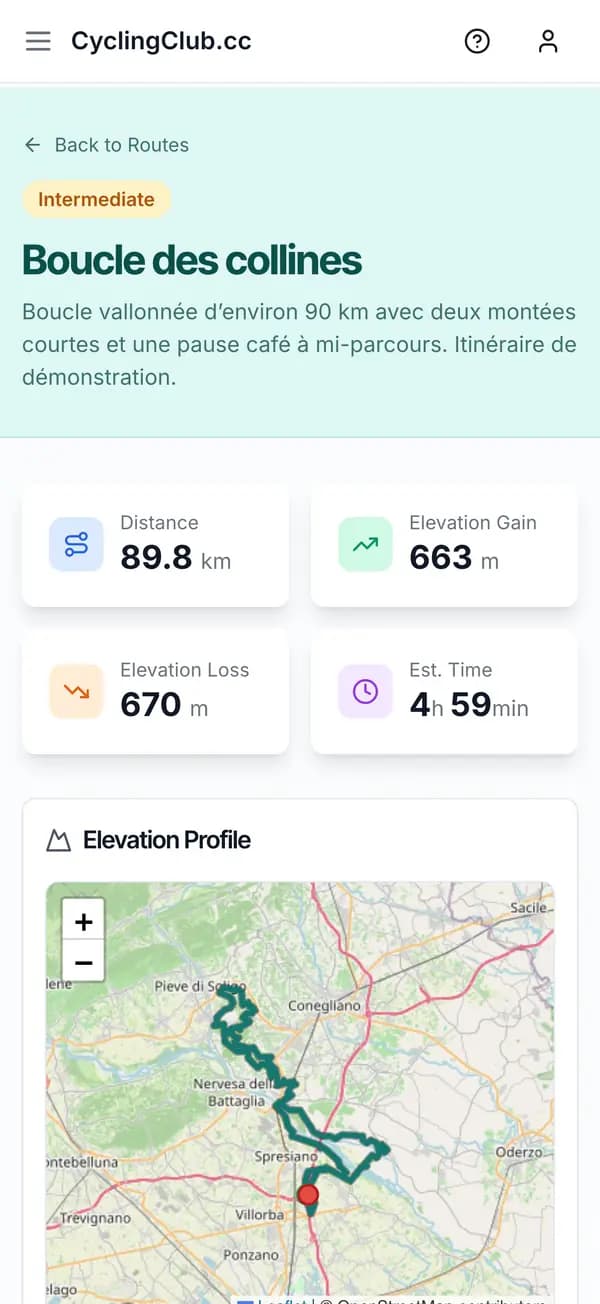
Each route page shows the map with an elevation profile linked to it (move along the profile and the map follows), the distance, climbing and an estimated riding time, the next club rides planned on it, and photos members have added.
Share a route in two taps
Every route page has a share card. Copy a ready-made summary (distance, climbing, estimated time, level and the link) to paste into the group chat, or send the route to WhatsApp, Facebook, LinkedIn or by email. Another link opens the start point in Google Maps.
Public route pages
Routes are public when you add them: each page can be shared and indexed by search engines, with the route and club name in the title and a preview card for social media. Untick public visibility on a route's edit page to keep it out of search results.
How it works
Create your club
Choose a name and a web address (your-club.cyclingclub.cc), create the first admin account and pick the club colours. It takes a few minutes.
Add your routes
Upload GPX files or import them from Strava. Distance and climbing are filled in from the track.
Organise them
Put routes into folders, set a level on each, and untick public visibility on any route that should stay out of search results.
Ride them
Pick a route when you create a ride or a recurring ride. Riders see its map and elevation profile on the ride page before they sign up.
Questions clubs ask
Which file format do we need?
GPX, which most route planners and bike computers export, including Komoot, Ride with GPS and Garmin Connect. Routes saved on Strava need no file at all: import them with a link or from your Strava account.
Can one route be used for many rides?
Yes, that is what the library is for. Choose the route when you create a ride, and the route page lists the upcoming rides on it. A recurring ride can also take a different route on a given date without changing the rest of the series.
Can riders see the route before they sign up for a ride?
Yes. The ride page shows the route map and its elevation profile and links to the full route page, so riders know the distance and the climbs before they commit.
Do all our routes have to be public?
No. New routes are public; untick public visibility on a route's edit page and it stays out of search results.
Can we organise routes by area or season?
Yes, with folders and sub-folders. A route can sit in several folders at once, say Winter and Flat, so riders find it whichever way they look.
What does the route library cost?
It is included in every plan, the free one included. The pricing page lists how many routes each plan holds.
Guides for club organisers
Other features
All featuresRide planner
Pace groups, recurring rides, caps and waitlists, carpools and ride-day check-in.
Members and payments
Join page and approvals, invites, roles, a ride waiver, and the club's own Stripe account for payouts.
Club shop
Kit and merchandise in sizes and colours, discount codes, card checkout and an order list.
Set up your club in a few minutes
Choose a name and a web address, create the admin account, pick the club colours. Free for clubs up to 1,000 members; paid plans with higher limits and custom branding are coming soon.