Ride planner
Ride planner for cycling clubs
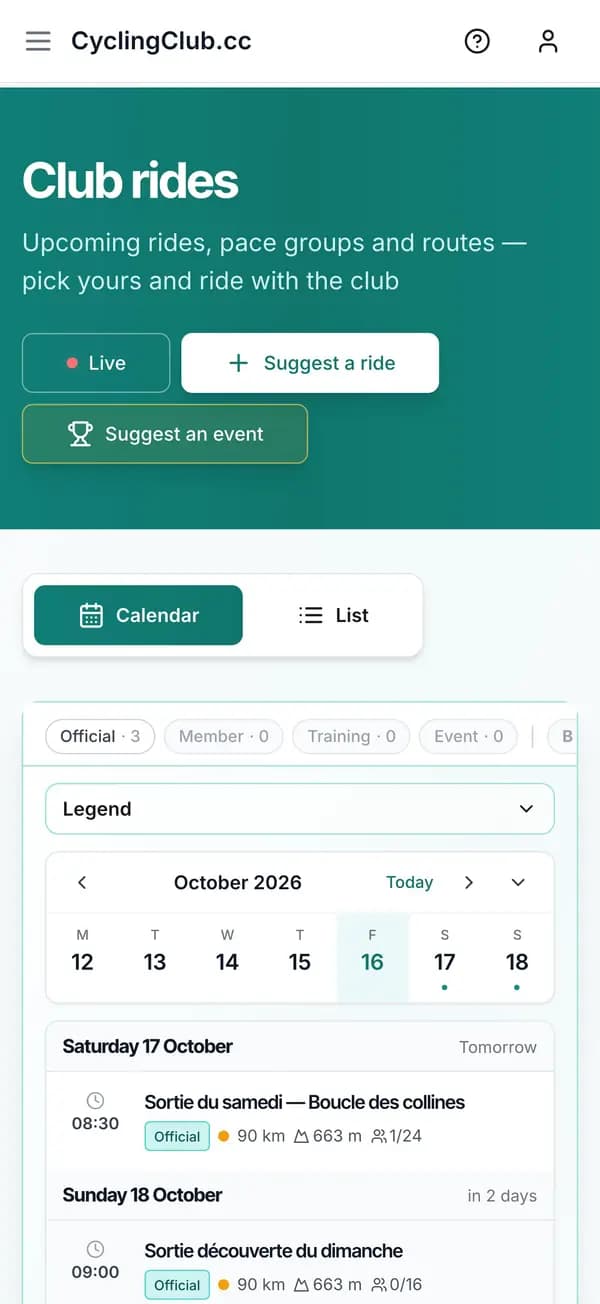
The CyclingClub.cc ride planner puts every club ride on one calendar, split into pace groups that riders pick when they sign up. It is built for the people who organise rides (ride captains, committee members, volunteer leaders) and keeps sign-ups, the waitlist, car shares and ride-day check-in on the ride page instead of scattered across a group chat.
Free for clubs up to 1,000 members.
What it does
Pace groups on every ride
Split a ride into as many groups as you need (A, B and C, or social, steady and fast) and give each one a pace. Riders choose their group when they sign up, and the planner suggests the one they rode with last time. Every ride also carries a level, from beginner to expert.
Recurring rides, set up once
Create the Saturday ride once: weekly, every other week, or on the first Sunday (or any other weekday) of each month. Skip holiday dates in advance. Upcoming rides are created for you, and changing one date (another route, a later start) leaves the rest of the series alone.
Caps and a fair waitlist
Set a maximum number of riders per ride. Once it is full, riders join a waitlist in order. When someone drops out, the next in line is offered the place and has a limited time to claim it; in the last 24 hours before the start, the place goes straight to them.
One page per ride
Each ride has its own page: route map and elevation profile, meeting point, a forecast for the start up to 16 days ahead (temperature, wind, chance of rain), the list of riders, and a carpool board where riders offer and claim seats. A link adds the ride to the rider's own calendar.
Ride leaders without the phone round
Say how many leaders each group needs. Once you switch it on in the club settings, the planner asks your leaders in turn and spreads the load fairly, sends an urgent call-out if nobody answers in time, and alerts the admins if a group is still uncovered.
Ride day: check-in, live map, SOS
Riders check in from their phone at the start, and the leader sees, group by group, who is there and who didn't show. On the road, riders can share their position on a live map, follow the ride chat and announcements, and press SOS to flag their location to the leaders. A QR code opens the ride page for newcomers.
How it works
Create your club
Choose a name and a web address (your-club.cyclingclub.cc), create the first admin account and pick the club colours. It takes a few minutes.
Add your routes
Upload GPX files or import routes from Strava, so each ride points at a real route with a map and an elevation profile.
Plan the rides
Create a one-off or a recurring ride: date, start time, meeting point, route, groups and paces, and a cap if you want one.
Share the link and ride
Members sign up and pick a group, get a reminder before the ride and check in on the day. You know who is coming before you leave home.
Questions clubs ask
Can riders choose their own pace group?
Yes. Each rider picks a group when they sign up, and the planner suggests the group they rode with last time. A ride doesn't have to have groups: without them, everyone signs up to the ride as a whole.
What happens when a ride is full?
New sign-ups go on the waitlist in the order they arrive. When a place opens, the first rider on the list is offered it and has a limited time to accept. Within 24 hours of the start, the place is given to them straight away.
Can someone try a ride before joining the club?
Yes. A ride leader can send them an invite link for that ride. They enter a name and an email address, with no account to create, and on the day they can see where the leaders are on the live map. If they want to keep riding with you, they join the club from its page.
Does it work on a phone?
Yes. CyclingClub.cc runs in any phone browser and can be added to the home screen like an app. Signing up, checking in, the live map and the ride chat all work from the phone.
How much does the ride planner cost?
Nothing for clubs up to 1,000 members. Rides are unlimited on every plan, the free one included. Paid plans with higher member, route and product limits and custom branding are coming soon; the pricing page has the details.
Guides for club organisers
Other features
All featuresRoute library
GPX upload and Strava import, folders, route pages with map and elevation, and public route pages.
Members and payments
Join page and approvals, invites, roles, a ride waiver, and the club's own Stripe account for payouts.
Club shop
Kit and merchandise in sizes and colours, discount codes, card checkout and an order list.
Set up your club in a few minutes
Choose a name and a web address, create the admin account, pick the club colours. Free for clubs up to 1,000 members; paid plans with higher limits and custom branding are coming soon.